
Giveaways & recurring rounds
Configure clear campaigns and review the result.
Create a campaign
Giveaways require Premium. Configure the destination, prize description, duration and supported participation rules through the dashboard or /giveaway. The server operator is responsible for eligibility, prize delivery and applicable rules.
Write understandable terms
Describe the prize and entry requirements clearly. Do not request passwords, payment-card details or private account credentials. PrynBot records campaign participation; it does not verify every real-world claim made by an entrant.
Use Giveaway Studio
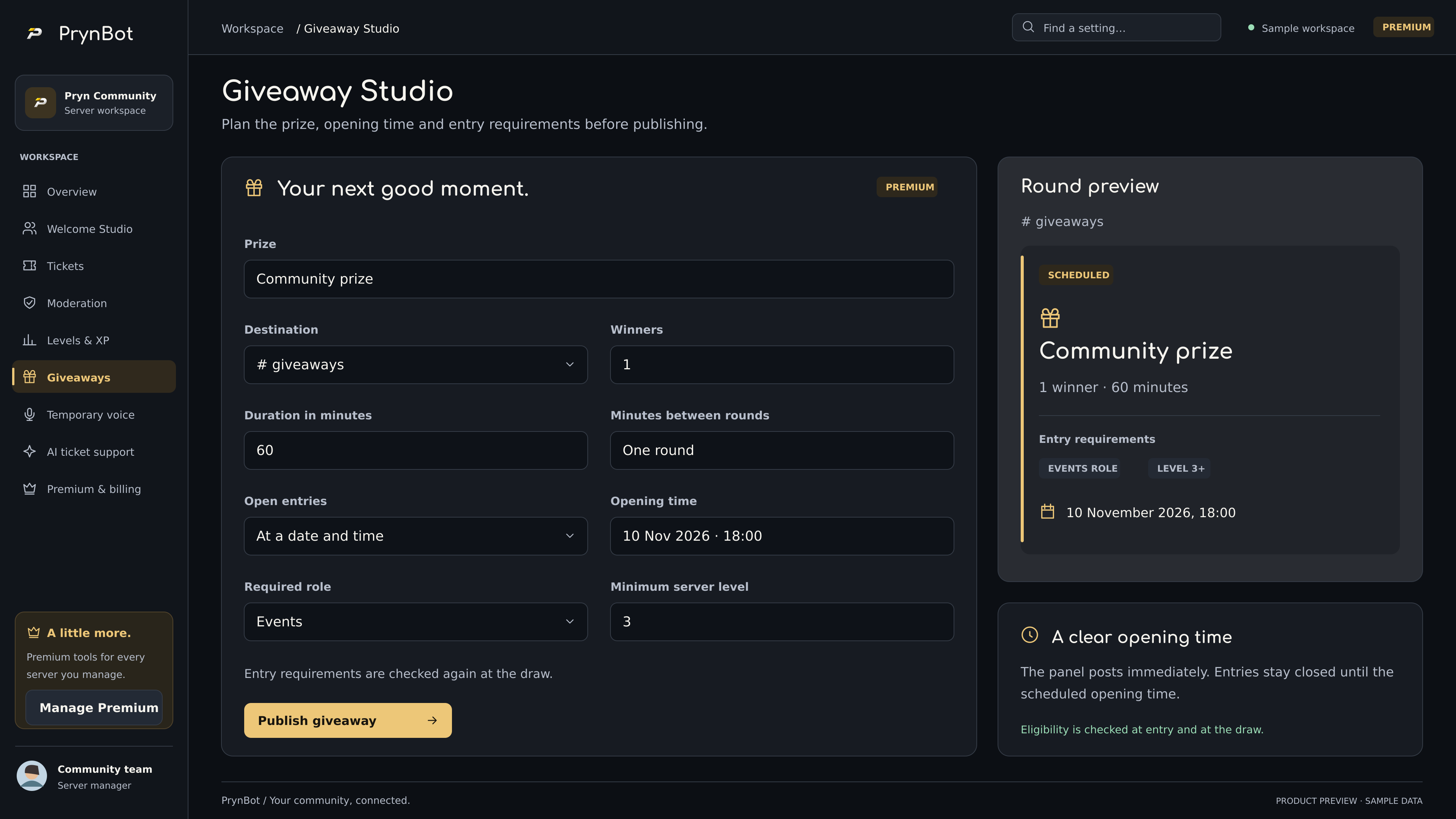
In PrynBot 2.8.0, enable giveaways, save the module settings and open Giveaway Studio. Enter the prize, destination, number of winners and round duration. The round preview updates before publishing. Only publish after reviewing the server’s giveaway terms and channel permissions.
Schedule when entries open
Choose At a date and time under Open entries and select a future opening up to 30 days ahead. The dashboard shows the local time zone. The giveaway message is posted immediately with entries closed until that time; it is not a delayed-message scheduler. The stored opening survives bot restarts, subject to host availability. Optional minutes between rounds configure recurring rounds.
Choose who can enter
Select an optional required role and minimum server level; level 0 adds no level restriction. When both are set, members must meet both. PrynBot checks these rules when a member enters and again at the draw. Role verification uses a fresh member lookup. If Discord cannot verify eligibility, the draw is retried rather than treating the member as ineligible. Prize delivery remains the organiser’s responsibility.
Manage outcomes
Use the supported campaign controls to end or cancel a campaign. Check the recorded result and message permissions. Do not promise a winner has received a prize solely because the bot selected an account.
Recover from interruptions
Campaign state is persisted, but Discord availability, permissions and host uptime still affect message delivery. Inspect the dashboard and logs before creating a duplicate campaign after a restart.